Universal Order Link for Suites
In suite settings, when the “allow un-assigned guests to place mobile orders?” toggle is ON, guests will see a “Continue ordering as guest” button when starting the checkout flow for Pre-Orders. Clicking “Continue as Guest” will allow unassigned users to plan an order for any suite/event (that has an active pre-order window) without account registration or reservations. Using this feature, guest pre-orders will be treated as open tabs, and event day orders will be a closed tab orders and will require a credit card. QR code flow will not be affected, and will continue to show the guest option regardless of the feature toggle. On game day, Suite Customers will have the flexibility to place orders for any unassigned or assigned (existing flow) suite via QR code.
Suite Admins can also create orders for unassigned suites via HH/POS. When creating orders on the device, there will be a new dropdown menu which prompts you to select “Assigned Suites”, “Unassigned Suites”, or “All Suites” for admins to edit.
o Note: If a Suite is set as Closed in the system, the Suite will not show in the list of suites via mobile ordering via pre-order link or QR ode.
o NOTE: Hosts & Owners will continue to see only their assigned suites and be prompted to login; their flow will not change.
o NOTE: Go to Suite Settings in your Suite Module and see the new “Universal Mobile Orders” tile to enable/disable this feature.

Suite Preference Questionnaire Enhancements
Suite Preference answers are now hidden in the Suite Order Summary. During the order flow, default answers are not pre-selected and guests are required to answer each mandatory question to proceed to the menu. We’ve also added a question which requests the anticipated suite attendance. Furthermore, partners can turn on/off any existing question desired. You can customize which questions show, or turn them off altogether, removing the questionnaire from the pre-order flow.
NOTE: Reach out to your CSM to make questionnaire customizations.


New Guest Facing Screen Capabilities
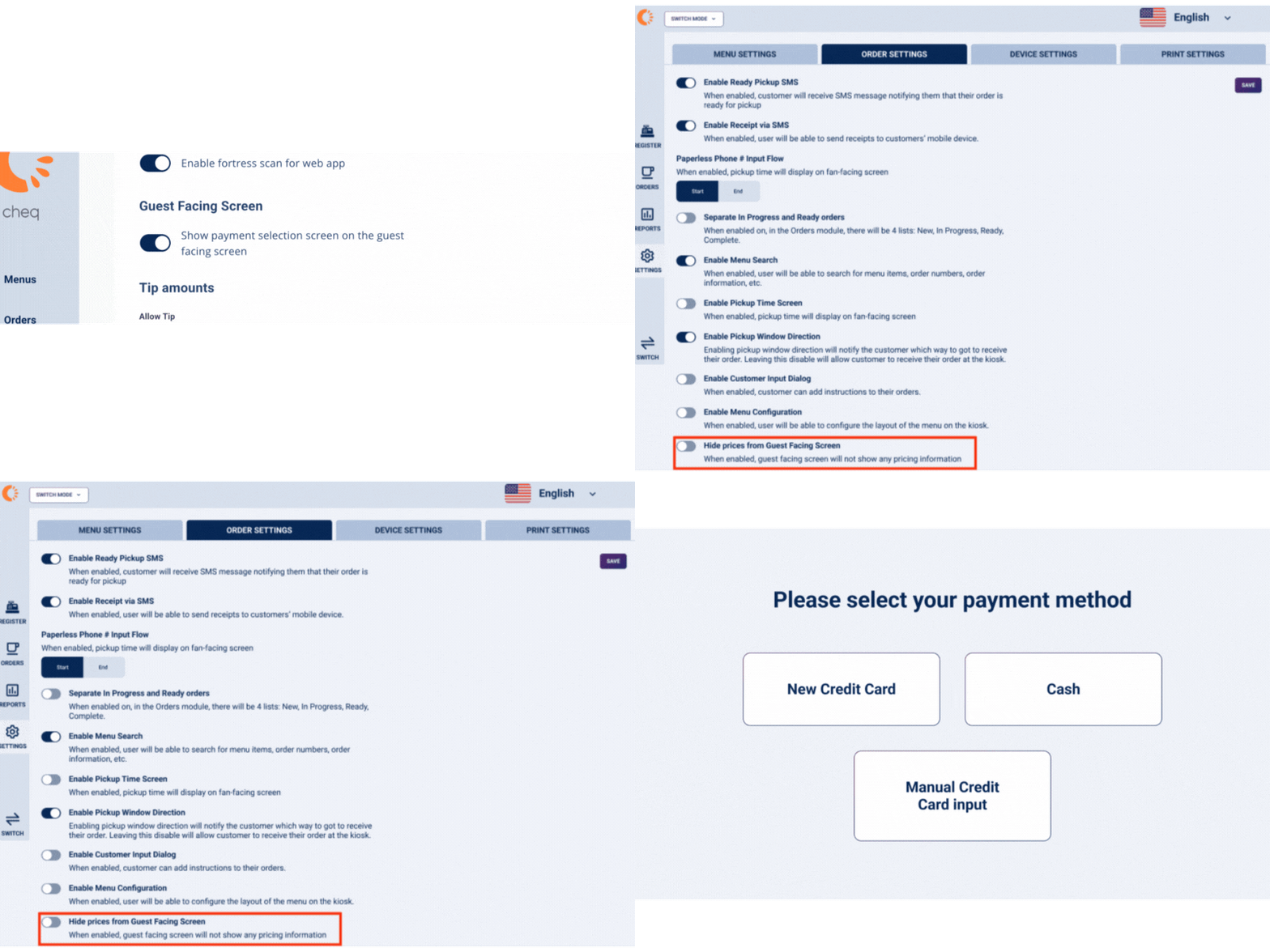
When enabled, customers will see the payment type prompt on the smaller guest facing screen, allowing them to select their desired payment type. They can also disable pricing via the toggle in “Order Settings” on the device which will hide all pricing information on guest facing screen.
Enhanced Orders Tab Search Features
Using the search bar in the orders tab, POS users can now search for the exact ticket total to pull up a specific order. Additionally, users can now quickly identify which server placed an order via the search bar in the orders tab section.

Introducing Admin Control for Editing Item Prices on the Device Level
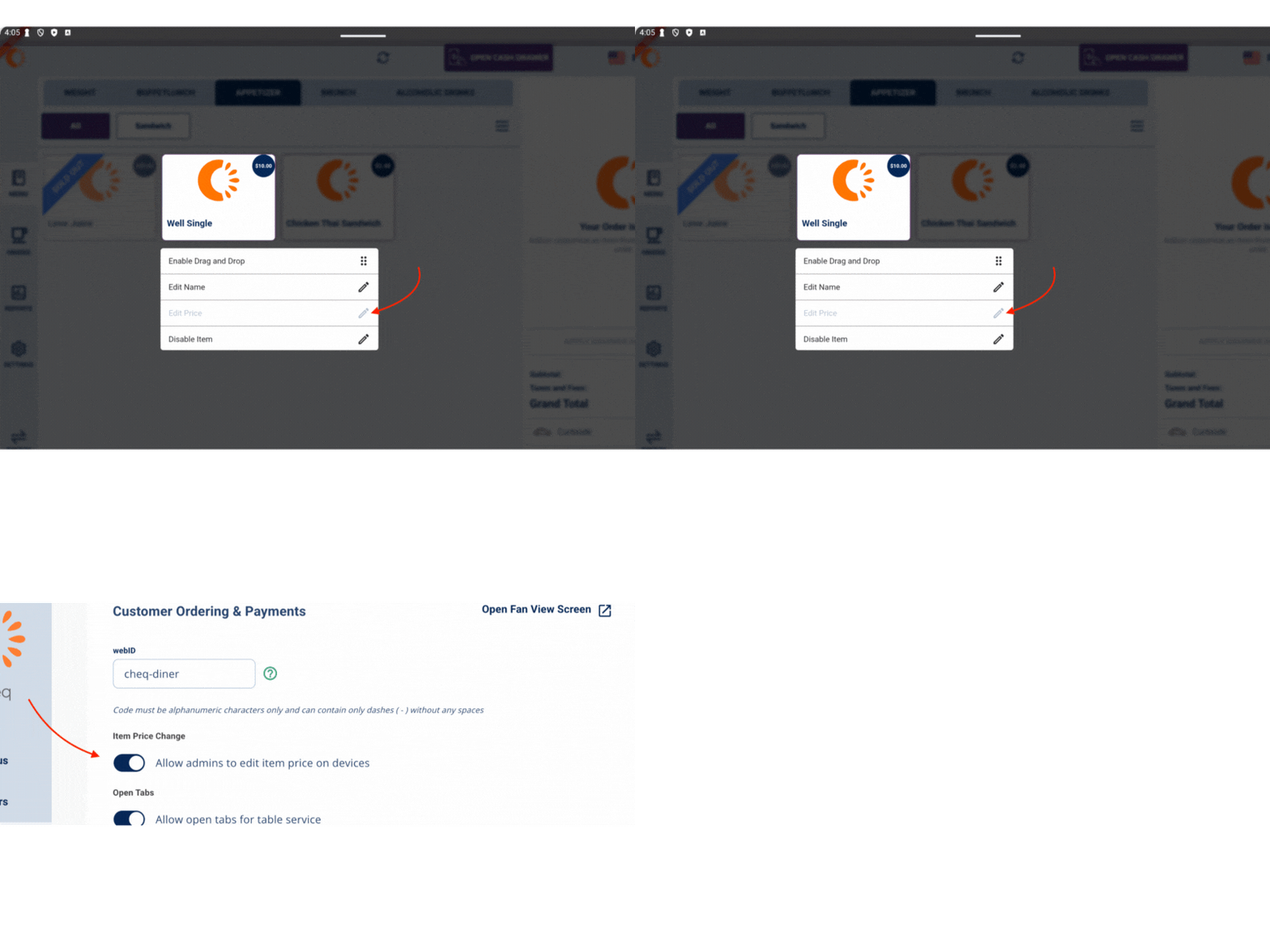
Empower your admins to manage menu prices with confidence. You can decide whether item prices can be edited on POS/HH with protected admin PIN for security. By default, the feature is ON. When disabled, prices are locked, while other menu adjustments remain accessible.
Special Menus for Suite Customers
Create a new menu in the “Menus” tab, and it will show up in the menu list in the “Special” pre-order or event day menu fields in the customer profile. When a special menu is assigned, POS & HH users will see the same menu that’s assigned in the Customer Profile. The default selection for these fields are “N/A” which does NOT apply any special pricing, and the guest will see the menu as it’s been set in event settings.

‘Regular’ (close tab) Capability for Suite Pre-Orders
In PWA, when you select “Regular” orders in the “Pre-order type for mobile orders” drop down field, all suites in system will be regular (aka close tab) orders, and will not be editable on game day. There will be a tip prompt enabled by default, in addition to any Service Fees already enabled. If you only want to present a tip prompt or service fee prompt, you can disable one of these via settings in the Revenue Center Business Settings Tab. Upon checkout, guests will be required to provide a form of payment, and the transaction will be processed right away.
Note: When “Regular” order type is enabled, the Pre-Order flow will not change for guests.

Open Tab Void & Comp Report
Now available in reporting, you can view voids & comps on all open tab orders. You’ll see “Comp Amount”, “Void Amount” and “Comps & Voids” amounts in the report. You can also click on the Order ID hyperlink to view order details, similar to Sales report functionality.
NOTE: Reach out to your CSM to enable this report for individual users.

Discount – Items Report
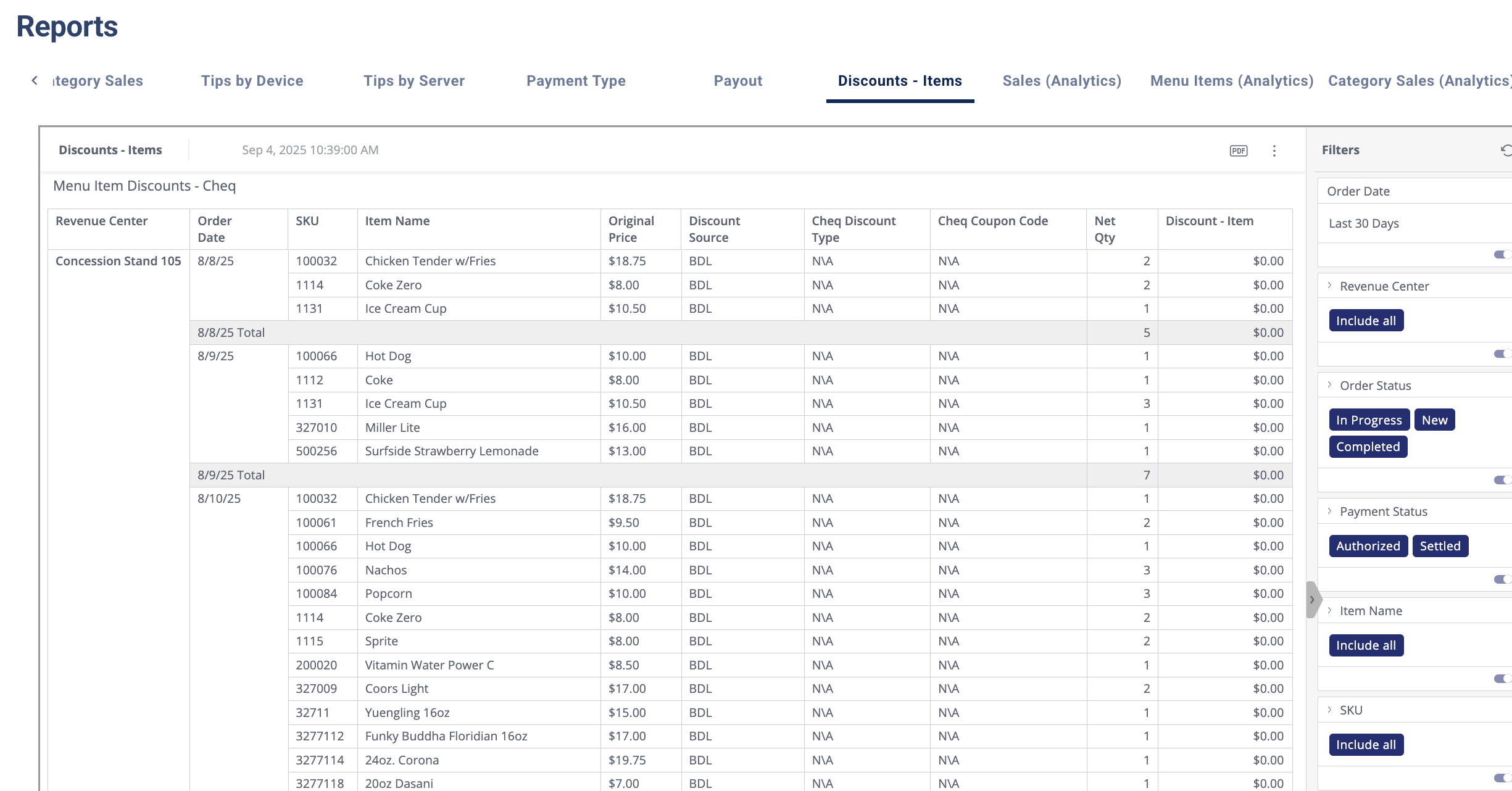
Combining what was previously 2 separate reports (Cheq Loyalty or Third Party loyalty such as Fortress & discounts), users can now view all loyalty and discounts in one report. Identify the amount of loyalty/discount applied to any given item, and view if Cheq or loyalty was applied.
We’re thrilled to announce our expansion into collegiate sports!
If you or your industry friends are in need of a Collegiate POS provider, please send them our way or reach out to your CSM for more information.
